On this page
To keep working through a power cut you need a power bank with a USB-C output of at least 65 W and a capacity of 20,000 to 25,000 mAh. That buys about one full laptop charge, enough to cover a three-hour rota cut with room to spare. Pick 65 W for thin office laptops and 100 W or more for larger ones.
- Output watts decide whether a laptop will charge at all.
- A 20,000 to 25,000 mAh bank holds about one laptop charge.
- One charge comfortably covers a three-hour planned cut.
- Your laptop must charge over USB-C for any of these to work.
- Keep the bank topped up. It is no use empty when the power fails.
A power cut on a working day does not have to end the working day. A laptop already has its own battery, and a high-output power bank adds roughly one more full charge on top. A phone-sized bank will not do it: laptops typically draw 45 to 65 W while charging, and a bank that only puts out 15 or 20 W will charge very slowly or not at all. The short version of the rules is in whether a power bank can charge a laptop.
These picks suit a planned three-hour rota cut or an afternoon without mains, for work, schoolwork or a video call. If you need a full day or more, you are into power station territory, and the comparison of backup power options shows where the line falls. Staying online is the other half of the job, covered in working from home in a power cut.
Our picks for a power cut, at a glance


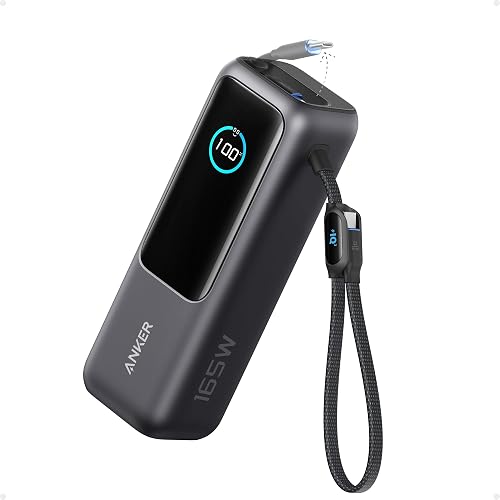


Anker 20,000mAh 87W Power Bank, Built-in USB-C
★ 4.6 from 10,800 buyers · About £38 when checked 18 November 2026The listing gives 87 W, which covers the 45 to 65 W most thin laptops ask for, with headroom. The USB-C cable is built in, so there is nothing to hunt for when the lights go out mid-morning. Rated 4.6 from more than 10,000 buyers, at under £40.
- 87 W covers most USB-C laptops
- Built-in cable
- Strong rating from a large number of buyers
- 20,000 mAh is about one laptop charge, often a little less
UGREEN Nexode 200W 25,000mAh, Smart Display
★ 4.5 from 3,600 buyers · About £56 when checked 18 November 2026The listing mentions a smart display, which matters in a cut because you can see what is left and decide whether the laptop or the phone gets it. Output is listed at 200 W and capacity at 25,000 mAh. Rated 4.5 from about 3,600 buyers, at around £55.
- Display shows remaining charge
- Highest output on the list
- More output than most households need
- 200 W is likely a total across ports, so check the per-port figure
Anker 25,000mAh Power Bank, 165W Total Output
★ 4.5 from 13,300 buyers · About £66 when checked 18 November 2026In a cut your phone is your hotspot as well as your phone, so it needs power alongside the laptop. The 165 W figure is the total across outputs, enough for both at a decent rate. Capacity is listed at 25,000 mAh. Rated 4.5 from more than 13,000 buyers, at about £65.
- High total output for two devices
- 25,000 mAh
- Very well reviewed
- Among the dearer picks
- 165 W is shared, not available from one port
UGREEN Nexode 140W 25,000mAh Power Bank
★ 4.4 from 8,200 buyers · About £45 when checked 18 November 2026Larger laptops that ship with a 100 W or 140 W charger need a bank that can keep up, or the battery drains while plugged in. This one is listed at 140 W with three ports and 25,000 mAh, rated 4.4 from about 8,200 buyers, at around £45.
- 140 W output
- Three ports
- Good price for the output
- A big laptop under load can empty it in well under two hours
INIU Compact 100W 25,000mAh Laptop Power Bank
★ 4.2 from 4,800 buyers · About £42 when checked 18 November 2026Sold as a compact laptop bank with 100 W output and 25,000 mAh, for around £40, so it can live in a work bag ready for a cut at home or in the office. The rating is 4.2 from about 4,800 buyers, lower than the Anker and UGREEN picks, so read recent reviews first.
- 100 W at a low price
- 25,000 mAh
- Lowest rating on this list
JUOVI 65W 20,000mAh Power Bank
★ 4.5 from 1,100 buyers · About £40 when checked 18 November 2026If your laptop came with a 45 W or 65 W charger, 65 W is enough to keep it running through a planned three-hour cut. This one is listed at 20,000 mAh, rated 4.5 from about 1,100 buyers, and costs around £40.
- Enough output for thin laptops
- Good rating
- Lesser-known brand
- Not enough for laptops that need 100 W
Belkin BoostCharge 20,000mAh 65W Laptop Power Bank
★ 4.3 from 349 buyers · About £68 when checked 18 November 2026Belkin lists this as a laptop power bank with 65 W output and both USB-C and USB-A ports, so a laptop and an older phone lead can share it during a cut. It is rated 4.3 from about 350 buyers and costs close to £70, so you pay more for the name.
- USB-C and USB-A ports
- Familiar brand
- Expensive for 65 W and 20,000 mAh
- Fewer ratings than the Anker picks
How we chose
These were chosen from Amazon UK listings on 18 November 2026 using the output and capacity stated in each listing, the price and the verified buyer ratings. This site has not hands-on tested them. One listing in this category claimed 60,000 mAh at a mid-range price and was left out because that figure is not believable. Prices and stock change.
Match the watts to your laptop's charger
Look at the small print on your laptop's own charger. If it says 45 W or 65 W, a 65 W bank will charge it at full speed. If it says 100 W or 140 W, a 65 W bank will still work on most models, but slowly, and it may not keep up while the laptop is busy. Your laptop also has to accept charging through USB-C. Models with a round barrel plug will not work with any of these. Typical appliance figures are in how many watts appliances use.
Be realistic about capacity
Capacity in mAh is misleading for laptops, because laptop batteries run at a higher voltage than the cells inside a power bank. In energy terms a 20,000 mAh bank holds roughly 74 Wh and a 25,000 mAh bank roughly 92 Wh, before losses. Many laptop batteries hold 50 to 70 Wh. So one bank is about one charge, sometimes less. Dim the screen, close what you do not need and it goes further.
Also remember that the bank has to be refilled. A large bank on a small phone charger can take most of a day, so use the laptop's own USB-C charger to recharge it when the mains is back.
Phones still come first
In a cut, your phone is the device that reaches 999 and 105. If the bank is your only backup, keep enough in reserve for phones before you spend it on a laptop. A separate cheap bank kept for phones is a sensible split, and the 20,000 mAh power banks for phones list covers those. The principles are set out in how power banks work.
When a laptop and a phone are plugged in together, the total output is shared, so the laptop may charge more slowly than the headline figure suggests.
When to move up to a power station
If you need to run a laptop, a monitor and a router for a full working day, a power bank is the wrong tool. A small power station with mains sockets and 250 Wh or more will do it with less fuss. Choosing a power station size walks through the sums.
As a rough guide, by the standard runtime sum a 300 Wh power station gives a 55 W laptop about four and a half hours of charging, several times what any bank here holds, and it will run the router too.
How much to spend on a laptop power bank for a power cut
Under £40 buys 20,000 mAh and 65 to 87 W, which is one laptop charge for a thin office machine and enough for a three-hour cut. Between £40 and £60 the listings move up to 25,000 mAh and 100 to 200 W, with extras such as a charge display, which suits bigger laptops and longer cuts. The high end here is £65 to £70. That money buys a higher total output for charging a laptop and phone together, or an established brand name, but not meaningfully more stored energy. One listing at about £110 offers no more capacity than the mid-range picks, so it was left out. If you need more hours, a small power station is the better step up.
Common questions
Can any power bank charge a laptop?
No. The bank needs a USB-C output of around 45 W or more, and the laptop must charge over USB-C.
How many laptop charges will 25,000 mAh give?
About one for most laptops. Smaller, efficient laptops may get slightly more, large ones less.
Is a 65 W power bank enough?
For most thin office and school laptops, yes. Check the wattage printed on your laptop's own charger.
How long does a big power bank take to recharge?
Several hours from a wall charger, and the title of a listing rarely says. Recharge it as soon as the mains returns.
Reviewed against these sources on 18 November 2026. If official advice has changed since, follow the official advice.
General information only. This page is not professional, safety, medical, legal or financial advice, and it is not official guidance. No national blackout has been forecast or announced, and nothing here suggests one is expected. We are independent and have no connection to the government or any energy company. Products are chosen from retailer listings and buyer ratings and have not been tested by us; some links earn us a commission. Anything involving electricity, gas, fuel or food safety should be checked with a qualified professional or the relevant official body before you act on it. Always check the official sources linked on this page. Full disclaimer
Keep reading
 Question
Can a power bank charge a laptop in a power cut?
A power bank can charge a laptop if both use USB-C Power Delivery and the bank supplies enough watts. What output and capacity to look for, with examples.
Read: Can a power bank charge a laptop in a power Guide
Power banks explained: mAh, watts and how many charges you get
What mAh and watts mean on a power bank, why you get fewer charges than the box suggests, and how to pick and store one ready for a UK power cut.
Read: Power banks explained: mAh, watts and how Question
Are power stations safe to use indoors in a power cut?
Battery power stations are safe to use indoors because they burn no fuel and give off no fumes. The sensible rules for charging, placing and storing one.
Read: Are power stations safe to use indoors in a Guide
Backup power for your home: every option compared
Power banks, power stations, generators, solar panels, cars and UPS units compared: what each can run in a UK power cut, for how long, and who needs which.
Read: Backup power for your home: every option