On this page
- Why a blackout site is talking about passwords
- Start with your email account
- Let a password manager remember the rest
- Two-step codes that still work in a power cut
- Updates and the devices people forget
- Backups you can reach without the internet
- Slow down when a message hurries you
- Checklist
- Common questions
Protect your email account first, with a strong password and two-step verification, because it resets every other account. Then use a password manager, keep devices updated, back up what matters and be slow to trust unexpected messages. These habits follow National Cyber Security Centre advice and also make your household easier to run when power or internet is disrupted.
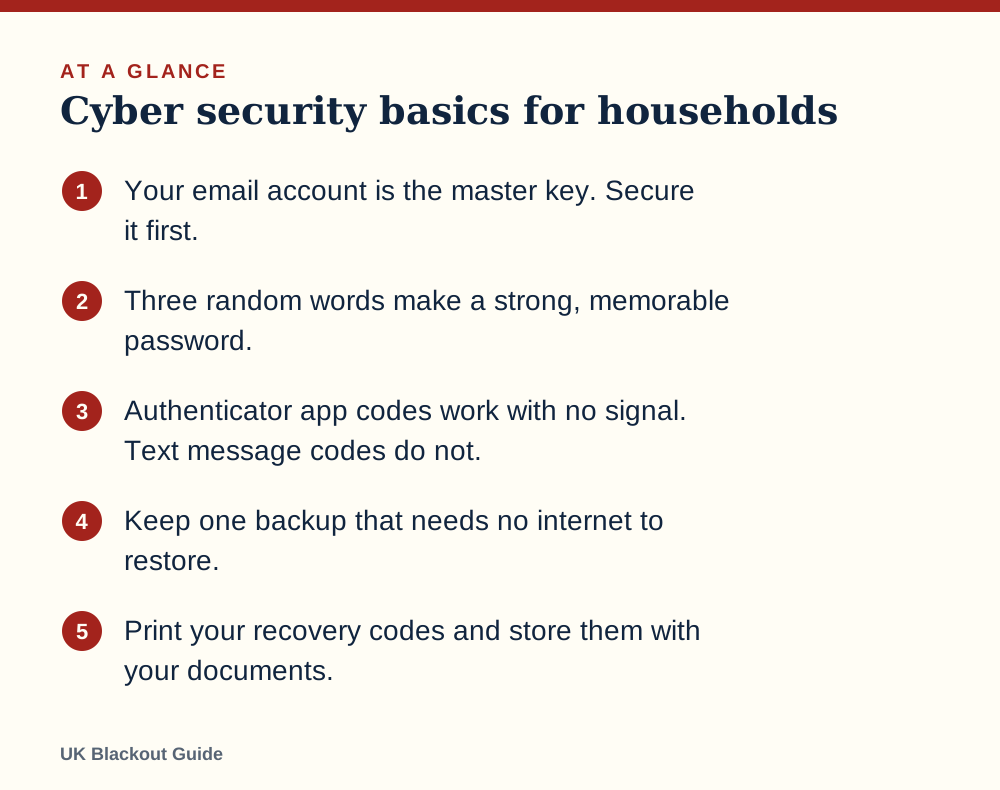
- Your email account is the master key. Secure it first.
- Three random words make a strong, memorable password.
- Authenticator app codes work with no signal. Text message codes do not.
- Keep one backup that needs no internet to restore.
- Print your recovery codes and store them with your documents.
Why a blackout site is talking about passwords
Two reasons. The first is that scam texts, fake compensation offers and bogus product adverts can borrow any topical subject, power cuts included, and good account security limits the harm if you are caught out. Those tricks are described in the scams linked to power cuts.
The second is practical. Much of household life now sits behind logins: banking, energy accounts, medical records, family photos. A power cut is a bad moment to discover that you cannot get into any of it because the code was sent to a phone with no signal.
You may also have read about hackers and the electricity network. The government has not said that a cyber attack on the grid is expected, and nothing on this page suggests one. Protecting the network is a job for its operators, not something a household can influence. We describe how the system works in general terms in cyber attacks and the power grid. Your part is your own accounts.
Start with your email account
Almost every online account lets you reset its password by email. Anyone who gets into your inbox can therefore take over the rest, one "forgot password" link at a time.
Give your email a password you use nowhere else. The National Cyber Security Centre (NCSC) suggests joining three random words, which gives something long enough to be strong and easy enough to remember. Then switch on two-step verification, which asks for a second proof, usually a code, when you sign in on a new device.
Do the same for banking, shopping accounts that store your card, and any cloud storage holding scans of your passport or policies.
Let a password manager remember the rest
Nobody can remember a different strong password for every site, and reusing one means a single leak opens many doors. A password manager stores them all behind one master password and fills them in for you.
The one built into your phone or browser is fine for most people. The NCSC also says saving passwords in your browser is safer than reusing weak ones.
Many password managers keep an encrypted copy on the device, so you can still look up a login with no internet. Check that yours does, and open it once in flight mode to be sure.
Two-step codes that still work in a power cut
How the second step arrives matters when networks are struggling. A code sent by text message needs mobile signal. Official Be Ready advice is that in a power cut mobile networks may work temporarily in some areas on backup power, as our answer on mobile phones in a power cut explains.
An authenticator app generates its codes on the phone itself, from the clock and a stored secret. It needs no signal and no internet, only a charged phone, so making your phone battery last matters here too. Where an account offers the choice, pick the app.
Most services also give you a set of one-time backup codes when you turn on two-step verification. Print them. Keep the sheet with your other papers, as described in which documents to copy and store. They get you in if the phone is lost, broken or flat.
A flat phone is the more likely problem, so a charged power bank is part of your security kit too.
Updates and the devices people forget
Software updates fix security holes that criminals already know about. Turn on automatic updates for phones, tablets and computers, and restart them when asked.
The forgotten devices are the ones without screens: the broadband router, smart TV, cameras, doorbells and plugs. Change any default password printed in a manual, and let them update themselves if the app offers it. Replace devices whose makers have stopped issuing updates when you reasonably can. What these gadgets do when the electricity goes off is a separate matter, set out in smart homes in a power cut.
After a power cut, devices that have been off may ask to update all at once. Let them finish before deciding the broadband is broken.
Backups you can reach without the internet
A backup protects you from theft, breakage, ransomware and your own mistakes. The usual advice is to keep more than one copy, with at least one somewhere other than your home.
Cloud backup handles the "somewhere else" well, but it is unreachable when the internet is down. Add an offline copy: an external drive or USB stick, updated every month or so and unplugged in between, so that a surge or a virus cannot reach it. Encrypt it if it holds personal papers.
If you use a desktop computer or network drive, sudden power loss mid-save can corrupt files. A battery backup gives it time to shut down cleanly, and the UPS battery backups we recommend cover the sizes. For the files you would want in an emergency, such as insurance schedules and ID scans, save them for offline viewing on your phone too.
Slow down when a message hurries you
Many frauds aimed at households are not technical. They are messages that create urgency: a missed parcel, a blocked account, a refund waiting, a relative in trouble on a new number.
The defence is to pause and check through a route you choose yourself. Do not use the link or the phone number in the message. Type the company's address, or ring the number on your card or bill. Forward suspicious texts to 7726 and suspicious emails to report@phishing.gov.uk.
Banking raises its own questions when power is out, including whether your banking app works in a blackout and whether card payments will function at all.
Agree a family rule now: nobody sends money on the strength of a message alone. A call back on a known number, or a question only the real person could answer, costs a minute. It belongs in your family communication plan.
Checklist
Cyber security basics for households
- Set a unique three-random-words password on your email
- Turn on two-step verification for email and banking
- Switch from text codes to an authenticator app where offered
- Print backup codes and store them with your documents
- Turn on automatic updates on every device
- Change default passwords on the router and smart devices
- Make an offline backup and unplug it afterwards
Common questions
Is it safe to write passwords down?
For most households the realistic risk is online, not a burglar reading a notebook. A written note kept somewhere private at home is better than reusing one weak password, though a password manager is better still.
Does antivirus software replace these steps?
No. Modern phones and computers have protection built in, and it works alongside strong passwords, updates and backups, not in place of them.
Can a power cut make my devices less secure?
Not directly. The risk is indirect: missed updates, rushed decisions and scam messages that use the outage as a hook.
What should I do if I think an account has been hacked?
Change its password from a device you trust, sign out all other sessions, check the recovery email and phone number, and contact your bank if money or card details are involved.
Reviewed against these sources on 18 November 2026. If official advice has changed since, follow the official advice.
General information only. This page is not professional, safety, medical, legal or financial advice, and it is not official guidance. No national blackout has been forecast or announced, and nothing here suggests one is expected. We are independent and have no connection to the government or any energy company. Always check the official sources linked on this page. Full disclaimer
Keep reading
 Buying guide
Best cash boxes for emergency cash at home
Lockable cash boxes for keeping emergency notes and coins ready at home for when card payments fail in a power cut. Eight Amazon UK listings compared.
Read: Best cash boxes for emergency cash at home Buying guide
Best fireproof document bags for emergency paperwork
Fire-resistant document bags for emergency paperwork: keep passports, policies, contacts and cash ready to grab. Seven Amazon UK listings compared.
Read: Best fireproof document bags for emergency Buying guide
Best multi-tools for home emergencies
Multi-tools for home emergencies: pliers, screwdrivers and a tin opener for the small jobs a power cut throws up. Seven Amazon UK listings compared.
Read: Best multi-tools for home emergencies Question
Do smart locks work in a power cut?
Most smart locks run on batteries and still lock and unlock in a power cut, but remote app control stops. What keeps working and how to avoid a lockout.
Read: Do smart locks work in a power cut?