On this page
A power cut does not wipe your router's settings. It restarts the router, and reconnecting can take 5 to 15 minutes. If it stays offline, the usual causes are a start-up that stalled, a separate fibre box that has not come back, or network equipment in your area that is still without power. A full power-off for 30 seconds fixes most cases.
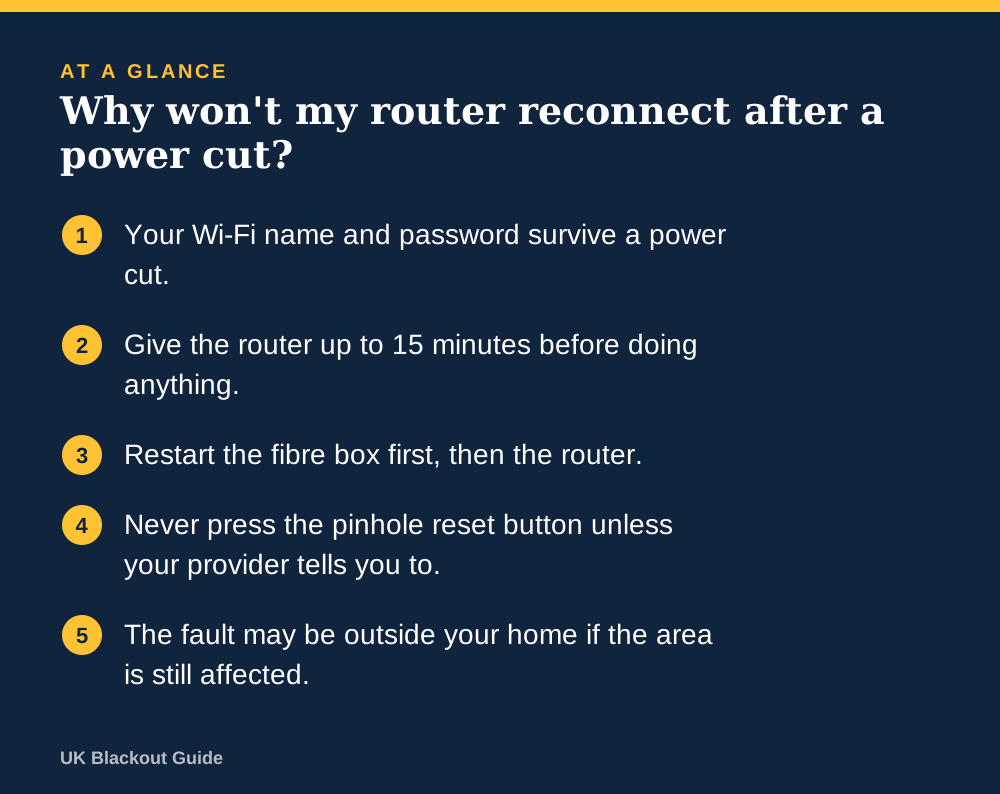
- Your Wi-Fi name and password survive a power cut.
- Give the router up to 15 minutes before doing anything.
- Restart the fibre box first, then the router.
- Never press the pinhole reset button unless your provider tells you to.
- The fault may be outside your home if the area is still affected.
A restart is not a reset
Routers keep their settings in memory that does not need power. When electricity returns, the router boots up with the same Wi-Fi name, password and configuration as before. Nothing has been erased.
What takes time is the reconnection. The router has to start its software, re-establish the line to your provider and sign in. On some connections, particularly those using a phone line, the line also retrains its speed, which can leave it slow for a while afterwards.
Why it sometimes stays offline
Everything restarted at once. If you have full fibre, there is a small box on the wall (the ONT) as well as the router. When both power up together, the router can give up before the fibre box is ready.
A stalled start-up. A brief flicker in the supply as power returns can leave a router half started, with lights on but no connection.
The network outside is still down. Street cabinets and exchanges have limited backup power. If the cut was wide, your home may have electricity before the equipment that serves it does, for the reasons set out in whether the internet works in a power cut.
Hardware damage. Occasionally a surge on return damages the router's power adapter, which is what a surge-protected lead is there to prevent. If no lights come on at all, this is the likely cause.
The restart order that fixes most cases
- Wait 15 minutes after power returns. Many routers sort themselves out.
- Switch off the router and any fibre box at the wall. Leave both off for 30 seconds.
- Switch the fibre box on first. Wait until its lights are steady, about two minutes.
- Switch the router on. Give it five to ten minutes.
- If you use mesh units or boosters, restart those last.
Check your provider's service status page using mobile data. If it shows a fault in your area, there is nothing to fix at your end.
Do not press the small recessed reset button. That one does restore factory settings, and you may lose your Wi-Fi name, password and any custom setup.
If there is still no connection after an hour and no reported fault, ring your provider. Tell them there has been a power cut and describe the lights on each box.
Stopping it happening next time
A router draws only about 10 to 15 watts, so a mini UPS for the router can carry it through short cuts and the flicker when power comes back. It never restarts, so it never has to reconnect.
A backed-up router is the first step in keeping Wi-Fi on in a power cut, though your provider's side has limits of its own.
It matters more if your phone runs through the router, because a digital landline needs mains power to make calls.
Common questions
Should I unplug my router during a power cut?
It is a sensible precaution against a surge when power returns. Plug it back in a few minutes after the supply is steady.
Why is my broadband slow after a power cut?
Some connections retrain their speed after a restart and settle over the following hours or days. If it stays slow, contact your provider.
Do I need to re-enter my Wi-Fi password on my devices?
No. The router keeps the same network name and password, so devices rejoin by themselves once it is back online.
Reviewed against these sources on 18 November 2026. If official advice has changed since, follow the official advice.
General information only. This page is not professional, safety, medical, legal or financial advice, and it is not official guidance. No national blackout has been forecast or announced, and nothing here suggests one is expected. We are independent and have no connection to the government or any energy company. Always check the official sources linked on this page. Full disclaimer
Keep reading
 Guide
Smart homes in a power cut: locks, heating and cameras
What happens to smart locks, heating controls, cameras, bulbs and hubs in a power cut, which ones fail safely, and how a small battery backup helps.
Read: Smart homes in a power cut: locks, heating Buying guide
Best cash boxes for emergency cash at home
Lockable cash boxes for keeping emergency notes and coins ready at home for when card payments fail in a power cut. Eight Amazon UK listings compared.
Read: Best cash boxes for emergency cash at home Buying guide
Best fireproof document bags for emergency paperwork
Fire-resistant document bags for emergency paperwork: keep passports, policies, contacts and cash ready to grab. Seven Amazon UK listings compared.
Read: Best fireproof document bags for emergency Buying guide
Best multi-tools for home emergencies
Multi-tools for home emergencies: pliers, screwdrivers and a tin opener for the small jobs a power cut throws up. Seven Amazon UK listings compared.
Read: Best multi-tools for home emergencies