On this page
Your router needs only 10 to 15 W, so a small battery backup can keep Wi-Fi on for hours. A mini UPS runs a router for roughly 2 to 3 hours and a 250 Wh power station for about 17. It only works if your broadband provider's network outside your home still has power.
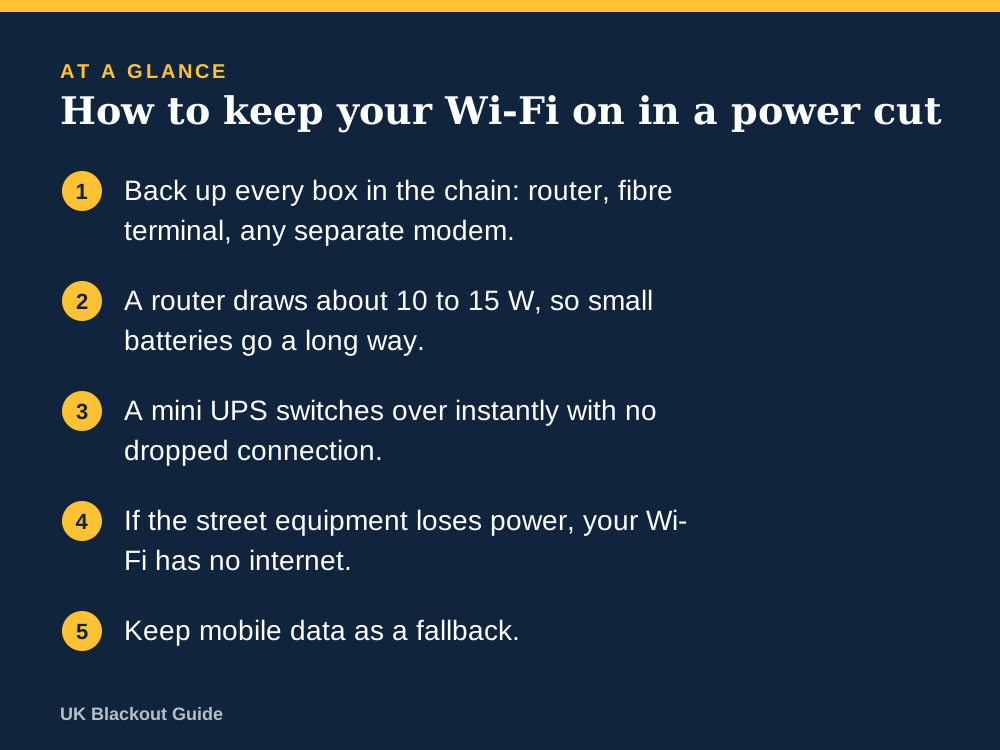
- Back up every box in the chain: router, fibre terminal, any separate modem.
- A router draws about 10 to 15 W, so small batteries go a long way.
- A mini UPS switches over instantly with no dropped connection.
- If the street equipment loses power, your Wi-Fi has no internet.
- Keep mobile data as a fallback.
Why Wi-Fi drops the moment the power goes
A home router has no battery. When the mains fails it switches off, and so does anything else in the chain: the fibre terminal on the wall (often called an ONT) in a full fibre home, or a separate modem if you have one. Mesh units and Wi-Fi extenders around the house go dark as well.
Your phone or laptop may still show a Wi-Fi symbol for a moment, then fall back to mobile data. A digital landline that plugs into the router stops too.
The good news is that this equipment uses very little power. A router typically draws 10 to 15 W and a fibre terminal a few watts more. That makes Wi-Fi one of the easiest things in the house to back up.
The part you cannot control
Powering your own router solves half the problem. Your connection also depends on equipment in the street and the exchange. Some of it has battery or generator backup and some has little or none, and it varies by provider, technology and area.
In a short local cut affecting only your street, the wider network is often still running, so a backed-up router usually keeps you online. In a wide outage lasting many hours, whether the internet keeps working in a power cut is out of your hands, so expect the connection to fail at some point however well your own kit is powered.
So treat router backup as cover for the common case, the cut of an hour or three, and not as a guarantee for a regional blackout.
Option one: a mini UPS made for routers
A mini UPS is a small battery box that sits between the router's power adaptor and the router. It passes power through while the mains is on and takes over instantly when it fails, so the connection does not even blip. Because it supplies low-voltage DC directly, it wastes little energy.
How long a UPS will run a router depends on battery size. Many are described in mAh. A 10,000 mAh unit holds about 37 Wh. Using the standard sum (Wh times 0.85, divided by watts), that gives a 12 W router about 2.6 hours. That happens to match a rota cut, which would last about three hours at a time, though you would want a larger unit to cover one fully.
Before buying a mini UPS for a router, read the label on your router's power adaptor. You need the output voltage (commonly 12 V, sometimes 9 V or 5 V), the current in amps, and the plug size. The UPS must match the voltage exactly and supply at least that current.
Option two: a standard UPS
A conventional UPS battery backup has mains sockets, so you plug the router's own adaptor into it along with anything else you want protected, such as a desktop PC or a network drive. It also switches over instantly.
It is less efficient for a small load, because it converts battery power up to 230 V only for the router's adaptor to convert it back down. Runtime for a router alone is often a couple of hours on a small unit, sometimes more. Its real strength is protecting a computer from a sudden shutdown, and that is the job to have in mind when comparing mains-socket UPS battery backups.
Option three: a power station or power bank
For longer cuts, a portable power station is the simplest answer. Plug the router's adaptor into it and do the sum: a 250 Wh unit gives about 212 Wh usable, which runs a 12 W router for around 17 hours. A 500 Wh unit manages about 35 hours, or a router and fibre terminal drawing 20 W between them for about 21.
Unless the power station has a UPS mode, there will be a gap while you plug things in, and the router will take a few minutes to restart. That is a minor nuisance at home.
Some routers are powered by USB-C or can be run from a power bank using a USB to 12 V step-up cable. It works, but check the voltage and current carefully against the router's label before trying it.
Setting it up so it works on the night
- Trace the chain from the wall to your devices and list every powered box.
- Put all of them on the backup. A powered router is useless if the fibre terminal next to it is off.
- Leave mesh nodes and extenders off the backup and work near the main router instead.
- Test it: switch off at the wall and check you can still load a web page.
- Time how long it lasts, once, so you know what you have.
During a cut, reduce the load on the connection so it is there when you need it, which matters most if you are working from home during a power cut.
When the broadband fails anyway
Have a fallback. Most phones can share mobile data as a hotspot, which is enough for email and messaging on a laptop. Mobile masts in a power cut may work temporarily on backup power in some areas, so this is not guaranteed either.
Wi-Fi calling in a power cut, which many people rely on in homes with weak signal, also depends on the broadband staying up. For news when every connection is down, a battery or wind-up FM radio is the dependable option.
Common questions
Will my provider give me a battery backup?
Providers may give people who depend on a digital landline a free battery backup unit lasting at least one hour. Ask your provider whether you qualify.
Can I plug my router into a power bank?
Only if the router accepts USB power or you use a step-up cable matched to its voltage and current. A purpose-made mini UPS is the simpler route.
Does a mini UPS wear out if left plugged in?
Its battery ages like any other and will need replacing after some years. Test the runtime once or twice a year so you notice when it fades.
Reviewed against these sources on 18 November 2026. If official advice has changed since, follow the official advice.
General information only. This page is not professional, safety, medical, legal or financial advice, and it is not official guidance. No national blackout has been forecast or announced, and nothing here suggests one is expected. We are independent and have no connection to the government or any energy company. Anything involving electricity, gas, fuel or food safety should be checked with a qualified professional or the relevant official body before you act on it. Always check the official sources linked on this page. Full disclaimer
Keep reading
 Guide
UPS battery backups explained
What a UPS battery backup does, how it differs from a power station, what VA and watts mean, how long one lasts and which type suits a UK home.
Read: UPS battery backups explained Buying guide
Best router battery backups to keep Wi-Fi on in a power cut
Router battery backups that keep Wi-Fi on in a power cut: mini UPS units from Amazon UK listings, with runtime sums and the checks to make before buying.
Read: Best router battery backups to keep Wi-Fi on Buying guide
Best UPS battery backups for power cuts
UPS battery backups for UK power cuts, 550 to 1,050 VA, chosen from Amazon UK listings: what they keep running, for how long, and what to check first.
Read: Best UPS battery backups for power cuts Question
How long will a UPS run a router in a power cut?
A mini UPS runs a typical router for about 2 to 6 hours, depending on capacity. How to work out runtime in minutes, and what else needs power for wifi.
Read: How long will a UPS run a router in a power